Services


Introduction
AI customer service automation SMB is the use of rules, AI models and connected workflows to classify, route and answer customer requests without adding headcount. It matters because a small team stretched across service, sales and operations cannot hire its way through volume growth.
Most owners jump from "we need to respond faster" to "let's buy a chatbot." Those two decisions are unrelated. The cost of that leap shows up as unresolved tickets, missed follow-ups and reps typing data instead of closing deals. This guide gives you a workflow-level framework and a 90-day rollout built for teams without engineers, supported by tkxel's AI workflow automation service.
Quick answer: To start, audit 30 to 60 days of tickets, pick one frequent and predictable workflow, pilot it with your existing helpdesk or CRM, measure it against your baseline, then expand one workflow at a time.
Key Takeaways
- Review 30 to 60 days of support and sales activity before choosing any platform, so you automate what actually repeats.
- Pilot one frequent, predictable, low-risk workflow first, and add a second only after you have measured accuracy and handoff rates.
- Build a human escalation rule into every workflow on day one, so unusual requests never fall through the gap.
- Choose tools by fit with your current CRM and helpdesk, checking permissions, error handling and monitoring, not integration counts.
- Run tkxel's AI automation readiness assessment for SMBs before scaling past the first workflow.
Why SMBs get AI customer service automation wrong
Small businesses fail at automation because they skip the diagnostic step, not because the technology is hard. I have watched teams in delivery projects buy tooling first and define the process second. The tool then automates confusion faster.
Three levels of automation exist, and the difference drives your budget. Rules-based automation executes predefined actions when conditions are met, such as routing a ticket by category. AI-assisted workflows classify requests, summarize conversations and draft replies. Agentic systems go further and take actions across connected systems with delegated permissions. Most SMB workflows do not need the third level, and sensitive or low-confidence actions should always get human review.
Gartner's 2026 analysis shows CEOs are realizing AI is not simply another layer of automation but a catalyst for rebuilding the enterprise itself. Gartner For SMBs, service and sales operations are practical starting points because they hold frequent, repeatable work tied to revenue.
Ask one diagnostic question first: which interactions are frequent, predictable, measurable and low-risk? Start there.
AI as a service for SMBs: buy, configure or build
AI as a service means renting AI capability from a platform you configure, rather than building models or hiring engineers. For most SMBs this is the right entry point, because your helpdesk, CRM or workflow tool already includes triage, routing and drafting features.
Match the option to your constraint:
-
Configure what you own. Use automation rules inside your existing helpdesk or CRM. Setup takes days and needs no developer.
-
Add a workflow platform. Tools such as Make.com, n8n or HubSpot Workflows connect systems when one platform cannot do the job.
-
Commission a custom build. Choose this only when workflows span several systems, custom data or complex permissions.
Start at the top of that list and move down only when you hit a real limit.
Contact center automation and AI self-service for SMBs
Contact center automation for an SMB does not mean a call center replacement. It means automating the intake layer: classification, routing, acknowledgments and approved answers, so people handle only the requests that need judgment.
AI self-service gives customers a way to resolve common questions without waiting for an agent. For narrowly defined, low-risk requests, the system retrieves an approved answer or completes a predefined action. Anything ambiguous, sensitive or low-confidence routes to a person.
Day to day, it looks like this. A customer submits a request, the system classifies it, sends an immediate acknowledgment with an expected resolution time, and either resolves it with an approved response or routes it to the right queue. Your team sees only the tickets that need them.
Which workflows to automate first
To automate customer service workflows effectively, pick the ones that repeat often, follow a clear logic tree and consume disproportionate human time. Treat the figures below as planning estimates, since results depend on volume, configuration and review needs.
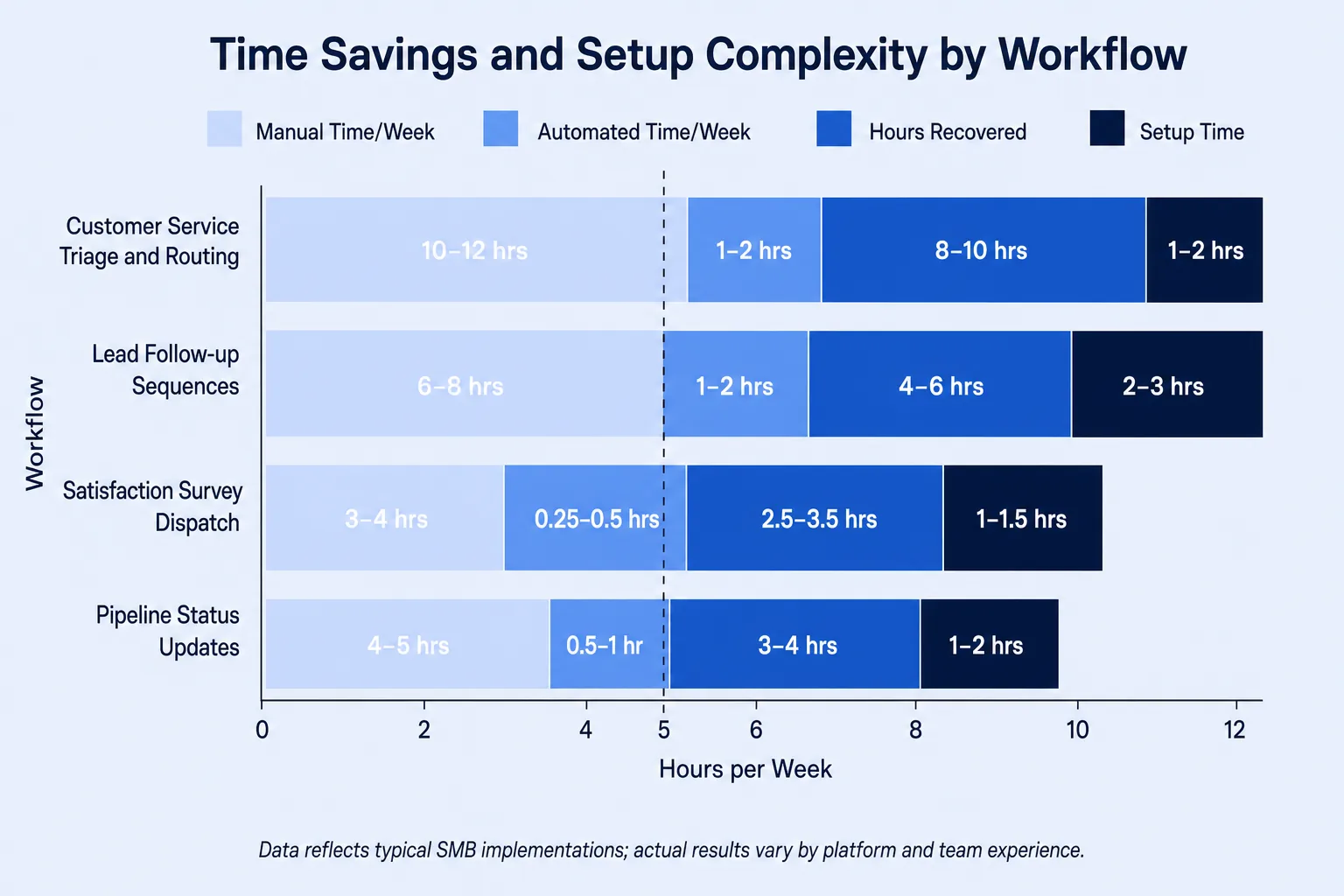
The table shows estimated weekly effort and setup time for four workflows in a typical SMB team.
| Workflow | Manual time per week | Automated time per week | Hours recovered | Setup time |
|---|---|---|---|---|
| Customer triage and routing | 10-12 hrs | 1-2 hrs | 8-10 hrs | 2-4 days |
| Lead follow-up sequences | 5-7 hrs | 0.5 hrs | 4.5-6.5 hrs | 3-7 days |
| Satisfaction survey dispatch | 2-3 hrs | 0.1 hrs | 1.9-2.9 hrs | 1-2 days |
| Pipeline status updates | 3-4 hrs | 0.5 hrs | 2.5-3.5 hrs | 5-10 days |
Triage is often the best first move. The system classifies each request by intent, urgency and account type, then routes it. Resolution rates vary with ticket mix, knowledge quality and how each vendor defines "resolved," so build a baseline from your own data.
Sales ops automation for small business
Sales ops automation small business teams can run today covers lead follow-up, lead assignment, pipeline updates and meeting reminders. These tasks repeat daily, follow consistent logic and eat rep time.
This sales operations automation guide keeps it simple. Platforms like HubSpot Workflows or Make.com trigger messages, create tasks, route leads and update records based on defined conditions. Monitor for failed runs, duplicate contacts, consent requirements and exceptions that need a person. Measure the current time spent before you estimate what automation recovers.
The 90-day implementation framework
The biggest SMB gap is not budget but structured process. Larger firms have implementation teams. You have an owner, an ops coordinator and a deadline.
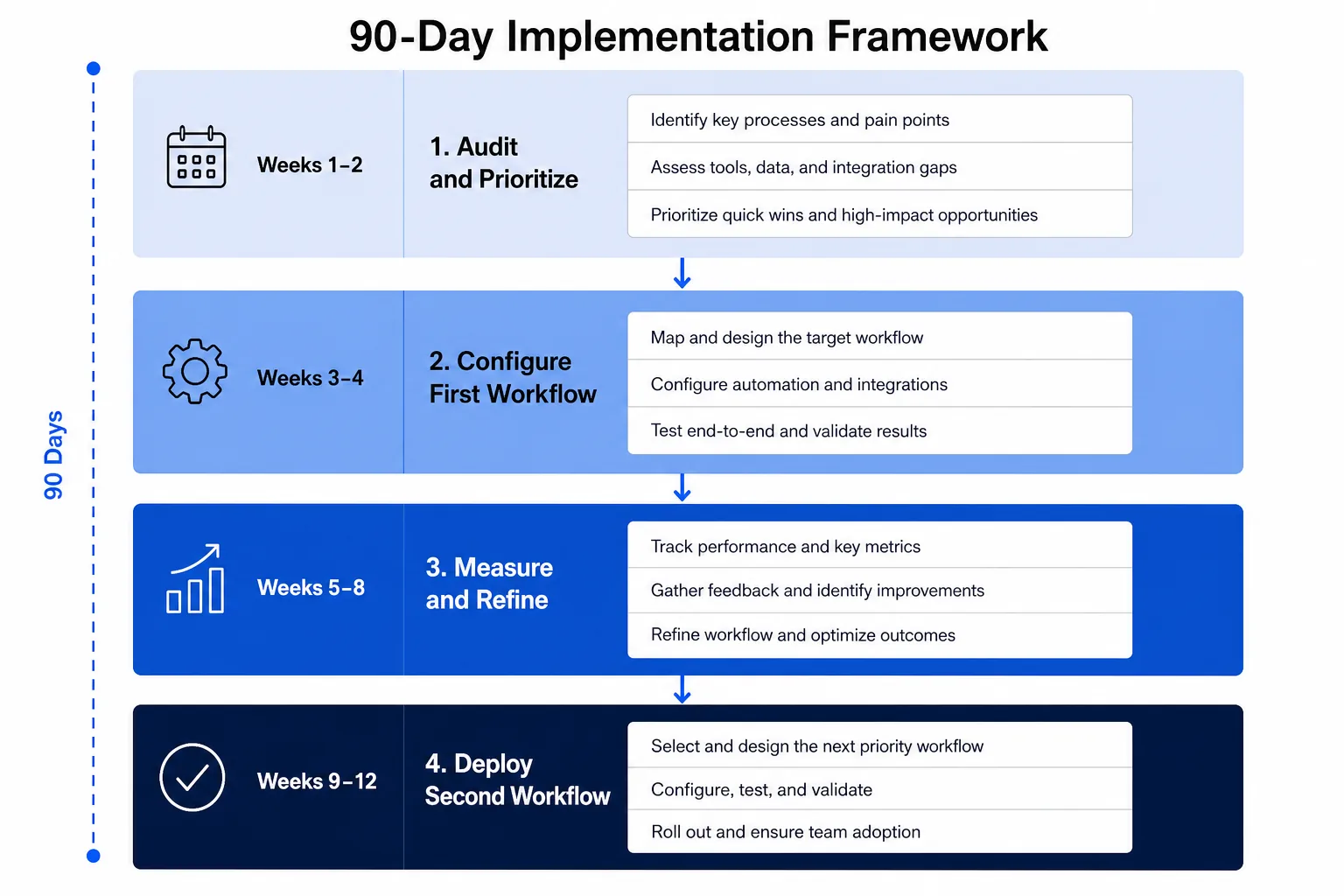
Use this sequence to pilot one or two workflows on your existing tools. Simple builds rely on visual configuration, while multi-system workflows may need APIs or technical help.
-
Weeks 1-2, audit and prioritize. Review 30 to 60 days of tickets and sales activity. Group recurring types and rank them by frequency, time consumed, customer impact, complexity and risk.
-
Weeks 3-4, configure your first workflow. Choose the highest-volume, lowest-complexity interaction. Set up triage routing with your helpdesk rules, then test against anonymized historical tickets, including ambiguous, sensitive and escalation cases.
-
Weeks 5-6, measure results. Track routing accuracy, automated resolution rate, handoff rate, incorrect-resolution rate, response time and customer feedback against your baseline.
-
Weeks 7-8, add lead follow-up. Trigger an approved sequence when a qualified lead meets defined conditions. Apply consent, suppression and unsubscribe rules, and route replies to a person.
-
Weeks 9-10, launch the satisfaction survey. Fire a short survey automatically at ticket close. Collect enough responses to compare with the old process.
-
Weeks 11-12, review and expand. Compare KPIs with the baseline and add the next workflow from your audit list.
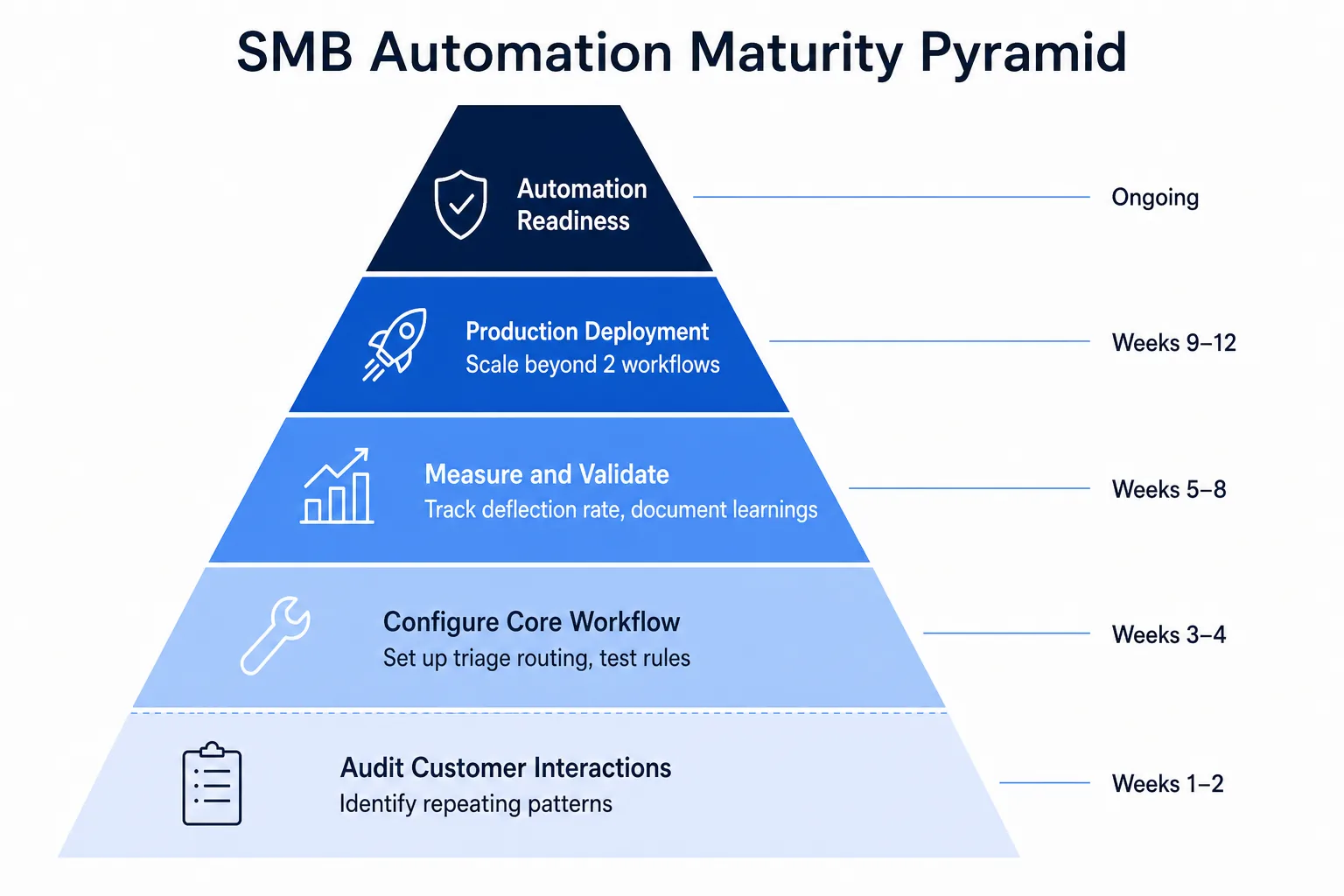
Progress is not the count of workflows deployed. Each stage should produce evidence that justifies the next. Accenture's 2024 research found three in four (74%) organizations have seen investments in generative AI and automation meet or exceed expectations. Accenture Structure is the common thread, and random tool adoption is absent from that statistic.
ROI metrics for AI workflow automation customer service
AI workflow automation customer service results need specific metrics, because "we respond faster" is not a number. Track four from day one:
-
Ticket deflection rate: the share of requests resolved without a human. Set a target from your own baseline and refine as routing matures.
-
First response time: how fast a customer gets an acknowledgment or answer.
-
Lead response latency: the gap between lead capture and first outreach.
-
Hours recovered per week: the simplest metric. Report it to your team weekly, because it builds buy-in faster than anything else.
Common failure modes
Four patterns kill SMB projects before they pay off.
-
Automating without a data audit. Rules built before you know what you are routing misclassify tickets and create rework. Finish the audit first.
-
Choosing by feature list. A tool that does not connect to your CRM or helpdesk forces custom development. List your tools first, then check data access, permissions and error handling.
-
Skipping the pilot. Going live on every ticket type makes failures impossible to diagnose. Run one workflow category for two full weeks.
-
No escalation path. Any ticket that matches no known category should route straight to a human queue.
These are process problems, not tool problems, and they surface when structured design is skipped.
Conclusion
SMBs that land in the majority seeing automation meet expectations share one behavior: they start with an audit, not a purchase. Automating triage and sales ops follow-up is achievable in 90 days without an IT team. Start the ticket audit this week.
Ready to move from framework to live workflow? tkxel helps SMBs design and deploy a first customer service or sales ops workflow in as little as three weeks. Book a 15-minute strategy call and we will tell you the one workflow worth automating first. For more on the customer-facing side, read how AI customer service automation SMB strategies improve support.