


 Services


Introduction
AI automation data privacy SMB is the practice of controlling which business and customer data an AI tool can see, store and reuse. It matters because data that enters a tool with loose terms cannot be pulled back. Owners are already asking the right questions, and IDC's analyst put the core worry plainly: "AI is a data guzzler," Evans says, because it "constantly needs new, fresh data to train its models." IDC Most small firms adopt tools before they set data rules. The result is customer records flowing into systems nobody vetted. This guide gives you a classify, vet, restrict, log and review process for AI workflow automation that you can run without a technical team.
Short answer: An AI automation data privacy SMB plan rests on three controls. Classify your data before connecting any tool, require written vendor terms on retention and training use, and give each automation only the access its task needs.
Key Takeaways
- Sort every data type into red, amber or green tiers this week, and connect only green data to new AI tools first.
- Ask every vendor in writing whether your data trains their models, how long they retain it and what happens at shutdown or acquisition.
- Give each automation its own limited account instead of an owner login, and review those permissions quarterly.
- Turn on action logs before go-live so you can trace any record an automation touched.
- Start with a low-risk workflow such as internal scheduling before touching customer records.
Why Data Privacy Becomes a Risk When SMBs Automate With AI
An AI automation data privacy SMB approach begins by deciding what information AI tools can access and how that information will be handled. Most small firms have no one reviewing those decisions.
The concern is well founded. According to Salesforce's Small & Medium Business Trends report, 41% of SMBs using AI identified security as a leading concern. Before connecting customer records, businesses need to understand what information a tool collects, who can access it, and how long it is retained.
Resources compound the problem. Research on workflow automation barriers lists limited financial resources, a lack of technical expertise, poor data quality and accessibility and organizational resistance to change Sryahwapublications as obstacles. A small team without a security specialist cannot read technical documentation, so it needs plain checks it can run itself.
Core Privacy Risks for Small Business AI Data Security
An AI automation data privacy SMB checklist should address four core risks, each with a specific control.
| Risk | What happens | Control |
|---|---|---|
| Training reuse | Vendor uses your inputs to improve its models | Written no-training clause |
| Over-retention | Data stays after the task ends | Retention limit of 30 days or less |
| Excess access | Automation holds owner-level permissions | 1 limited account per workflow |
| Vendor exit | Acquisition or shutdown strands your data | Deletion and export terms in the contract |
Training reuse is the risk owners ask about most. Over-retention is the one they miss. Excess access is the most common internal failure, because setup is fastest with an admin login.
Vendor exit deserves a clause before you sign. Require deletion confirmation and a data export in writing, so an acquisition or closure never leaves your records with a company you did not choose.
A Secure AI Workflow Automation Framework for Small Businesses
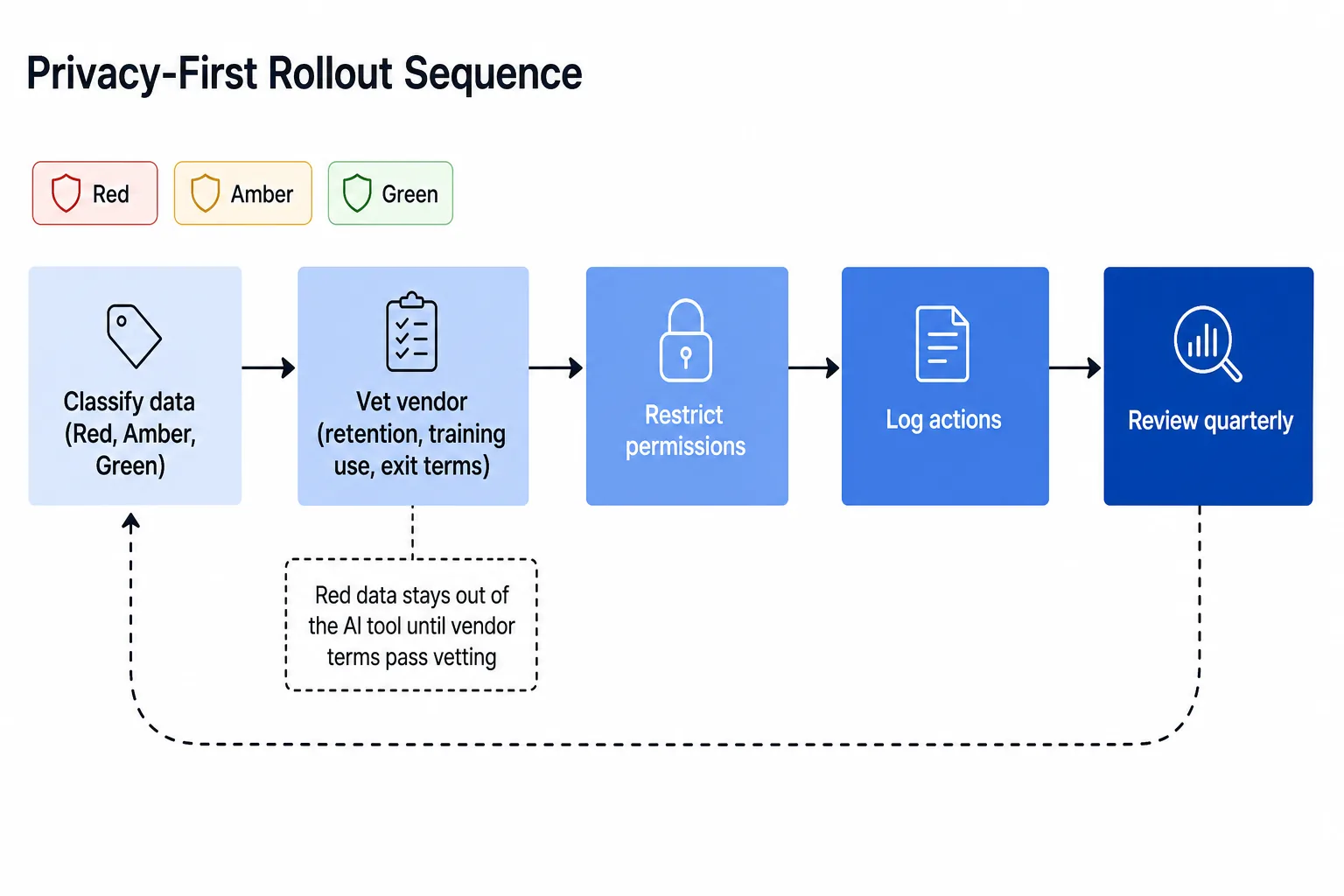
An AI automation data privacy SMB framework follows five steps: classify, vet, restrict, log, and review. Run them in order before any tool touches live data.
Framework diagram description: picture a five-box flow from left to right. Box 1 is Classify, with three colored tiers beneath it. Box 2 is Vet, with six questions. Box 3 is Restrict, with one limited account per automation. Box 4 is Log, with action records. Box 5 is Review, with an arrow looping back to Box 1 every quarter.
Step 1: Classify Data Before Connecting Any AI Tool
For AI automation data privacy SMB planning, begin by sorting business information into three tiers.
Red data is regulated or irreplaceable: payment details, health records, government IDs and signed contracts. Amber data covers customer contact details, pricing and employee records. Green data is public content, internal schedules and anonymized reports.
Connect green data first. Move amber data only after the vendor passes vetting. Keep red data out of third-party AI tools unless a contract and your counsel approve it.
Step 2: Vet Vendors on Retention, Training Use and Exit Terms
For AI automation data privacy SMB vendor screening, ask six questions and keep the answers in writing:
-
Is my data used to train your models, and can I opt out in the contract?
-
How long do you retain my inputs and outputs?
-
Where is the data stored and who can access it?
-
Do you hold SOC 2 or ISO 27001 certification?
-
What happens to my data if you are acquired or shut down?
-
Can I export and delete everything on request?
A vendor that hesitates on questions 1, 2 or 5 has told you what you need to know. Vague answers are a decision, not a delay. Store the written replies in a shared folder so the next owner or auditor can find them.
Step 3: Restrict Permissions to the Task
An AI automation data privacy SMB access policy should assign each automation a dedicated account with permissions limited to its task. Never run an automation on the owner's login.
Name each account after its workflow so you can see at a glance what holds access to what. Remove write access unless the task requires it, and remove the account the day the workflow ends.
The importance of access restrictions is reflected in IBM's 2025 Cost of a Data Breach Report, which found that 97% of organizations experiencing an AI-related security incident lacked proper AI access controls. This reinforces the need to assign each automation only the permissions required for its specific task.
Step 4: Log Every Automated Action
For AI automation data privacy SMB monitoring, turn on activity logging before go-live. A log that shows which record changed, when and by which automation lets you answer a customer or auditor in minutes.
Confirm that logs can be exported, since a log locked inside the vendor's tool disappears with the vendor. Keep a copy for at least 12 months.
Monitoring remains a gap in AI security practices. According to BCG's 2026 cybersecurity research, only 23% of surveyed organizations had implemented monitoring or logging for AI agents. Maintaining accessible activity records helps smaller businesses review automated actions and investigate unexpected changes.
Step 5: Review Permissions and Logs Every Quarter
To review the setup, schedule 1 hour each quarter to check three things: which accounts still exist, which data tiers each automation touches and whether any vendor terms have changed.
Retire unused accounts and re-run the six vendor questions after any ownership change. This is the step that keeps the first four from decaying.
When to Use This Framework and When Not To
Use this framework when you plan to connect customer, employee or financial data to any third-party AI tool. It fits owners without a security specialist who need checks they can run in a few focused days.
Do not use it as a substitute for legal review. Regulated data such as health records or payment card details needs counsel and compliance specialists, and red-tier data stays out of third-party tools until they approve. Skip the full process for workflows that touch only public content, where a single vendor check is enough.
Where Safe AI Automation Small Business Use Starts
Safe AI automation for a small business starts where data risk is low and payoff is clear. Begin with green-tier workflows, then move up one tier at a time.
-
Internal scheduling and reminders: no customer data involved.
-
Meeting notes and summaries: keep client financials out.
-
Invoice data entry: amber data, so approve the vendor first.
-
Customer service ticket routing: amber data, with retention limits set.
-
HR onboarding checklists: amber data, with access limited to HR.
Our guide on AI customer service automation for SMBs covers the ticketing case in detail. What an AI workflow is explains the basics for non-technical owners.
Cost Considerations for Privacy-Conscious SMBs
AI automation data privacy SMB purchasing decisions should consider vendor data-handling terms alongside licensing costs. A cheaper tool with open-ended retention can cost more after one incident than a stronger plan costs over years.
Check three plan features before price: a no-training guarantee on your tier, admin controls for per-user permissions and exportable audit logs. Business tiers usually include these, while free and consumer tiers often do not.
Budget for setup time too. Classifying data and vetting one vendor takes a small team a few focused days. If you are unsure where to begin, an AI readiness assessment for SMBs shows which workflow to automate first.
Conclusion
An AI automation data privacy SMB strategy makes privacy part of deployment rather than a reason to delay automation. Classify data, vet vendors in writing, restrict access, log everything and review quarterly. Each step is small, and together they let you automate with confidence.
Run the rollout in four moves. Classify your data this week, send the six vendor questions to your shortlist, pilot one green-tier workflow with a limited account and logging on, and expand to amber data after a 30-day log review.
Book a 15-minute call with tkxel. We will tell you the one workflow worth automating first and the data rules to set around it.
About tkxel
tkxel, a B2B software engineering and AI services company, builds automation in phases. We map your workflows and data, classify what is safe to connect and ship one quick win before expanding. Every deployment includes limited-permission accounts, action logging and written vendor terms.
We stay on after launch with ongoing support, reviewing permissions and logs with your team each quarter. tkxel has been named to the Inc. 5000 three years running, and our clients are growing businesses that want measurable results without handing over unvetted data.


