


 Services


Introduction
Automation finance is the use of software to execute repeatable finance tasks, such as invoicing, reconciliation and approvals, with controls and audit trails built in. It matters because finance teams that cannot show control over automated processes will not pass audit or board scrutiny. Most buyers purchase before their controls are ready: 42% of all organizations are strongly assurance-ready for AI-enabled finance processes KPMG, per KPMG’s 2026 global AI in finance report. Teams that skip that readiness work inherit audit findings alongside their new tooling. This guide gives mid-market CFOs vendor criteria, a head-to-head comparison and a board-case structure, with support from tkxel’s finance automation for the office of the CFO practice.
Short answer: Choose billing automation software by scoring vendors on ERP integration, controls and audit trail, exception handling, billing model fit and three-year cost. Then prove value in one billing flow before you scale.
Key Takeaways
- Score every vendor on a weighted scorecard that puts ERP integration and controls ahead of feature count.
- Document process owners, approval limits and audit evidence before purchase, so your controls can absorb the change.
- Pilot one billing flow for 4 to 6 weeks and baseline cycle time and error rates in writing before go-live.
- Build the board case on cost per invoice, days sales outstanding (DSO) and close-cycle hours, with a conservative and a target scenario.
- Keep humans on credit decisions, disputes and write-offs, and automate generation, matching and routing.
What Automation in Finance Means for Billing Teams
Automation in finance meaning, in practice, is that software performs rule-based work across procure-to-pay, record-to-report and order-to-cash while people handle judgment calls. Billing sits in order-to-cash. It is usually the first workflow where mid-market teams see payback from automation finance programs.
The term covers a wide range. Billing automation handles invoice generation, usage rating, delivery and dunning. Finance workflow automation reaches further into approvals, journal entries and close tasks. Accounting and finance automation as a whole connects these flows to the general ledger.
Three technologies sit underneath. Robotic process automation (RPA) replays fixed keystrokes in legacy screens. Rules engines apply pricing and tax logic. Machine learning classifies exceptions and predicts late payment. Buyers researching rpa robotic process automation finance should note that RPA is the weakest layer when a clean ERP application programming interface (API) exists.
Automation Finance Evaluation Criteria for Billing Automation Software
Evaluating billing automation software works best as a weighted scorecard with five criteria. Any automation finance purchase should be judged this way, and the weights below are tkxel planning estimates built on a controls-first posture; adjust them to your risk profile.
- ERP integration (25%). Confirm native, bidirectional sync with your ERP for customers, items, tax codes and posted invoices. Ask for a reference customer on your exact ERP version.
- Controls and audit trail (25%). Require role-based access, approval thresholds, immutable logs and segregation of duties. Have your auditors review sample logs.
- Exception handling (20%). Measure how the tool routes pricing disputes, missing purchase order (PO) numbers and tax mismatches to a named human queue.
- Billing model flexibility (15%). Test subscription, milestone, usage and one-time billing in a sandbox using your real contracts.
- Three-year total cost (15%). Include license, implementation, integration maintenance and internal admin time.
Ask each vendor to run ten of your hardest invoices through a sandbox. The results expose gaps that demos hide.
How to Choose Between a Finance Automation Platform and Point Tools
To choose between a finance automation platform and point tools, compare scope against integration burden. A finance automation platform covers billing, collections and reconciliation under one data model. Point finance automation tools solve one step each and require stitching, which is why automation finance buyers should map scope before price.
The table below compares three options on go-live time, connectors, cost and scope. All figures are tkxel planning estimates drawn from typical mid-market engagements; replace them with your own vendor quotes.
| Dimension | Billing-only tool | Finance automation platform | Custom build |
|---|---|---|---|
| Typical go-live | 6 to 12 weeks | 3 to 6 months | 6 to 12 months |
| ERP connectors | 1 to 3 native | 5 to 15 native | Built to spec |
| Annual license range | $20K to $80K | $80K to $300K | $0 licence, $150K to $500K build |
| Workflows covered | 1 (invoicing) | 4 to 8 (billing to close) | As scoped |
| Internal admin effort | 0.1 to 0.25 FTE | 0.5 to 1 FTE | 1 to 2 FTE |
Head-to-Head: Billing-Only Tool, Platform and Custom Build
Each automation finance option fits a different finance profile, and each carries a distinct failure risk. The three assessments below use the same lens: strengths, limits and the control burden you take on.
Billing-only tool
A billing-only tool wins on speed and price. It suits teams with one ERP, one billing model and a clear pain in invoicing. The limit is scope: collections, reconciliation and close still run on spreadsheets, so gains plateau after the first flow. The control burden is low, since the tool touches one process and one set of postings.
Finance automation platform
A finance automation platform wins on breadth. It suits multi-entity teams and usage-based pricing, where one data model prevents reconciliation gaps between billing and collections. The limit is implementation weight: expect 3 to 6 months and a dedicated owner. The control burden is moderate, because more workflows mean more approval limits and role mappings to document.
Custom build
A custom build wins on fit. It suits teams with unusual pricing logic or strict data residency demands. The limit is ownership: your team maintains the code, the connectors and the audit evidence. The control burden is highest, since every control must be designed and tested internally.
Recommendation matrix
The matrix maps team profile to the option that usually fits best.
| Team profile | Best fit | Decision test |
|---|---|---|
| One ERP, one billing model, under 5,000 invoices a month | Billing-only tool | Can one flow deliver payback inside 12 months? |
| Multiple entities or usage-based pricing | Finance automation platform | Does one data model remove a reconciliation step? |
| Non-standard pricing or residency constraints | Custom build | Can you staff 1 to 2 FTE for maintenance? |
| Limited budget, early-stage finance function | Billing-only tool, phased | Can you start with one entity at under $80K a year? |
To decide, answer the three tests in order. If the first test passes, stop there and buy the billing-only tool. If it fails, move to the platform. Choose a custom build only when neither packaged option can price your contracts correctly.
Will Finance Automation Software Integrate With Your ERP and Controls Environment?
Integration succeeds when the tool writes to your ERP through supported interfaces and leaves the general ledger as the single source of truth. In any automation finance rollout, avoid designs where finance automation software holds a second copy of customer or revenue data.
Check four items before signing:
- Which ERP objects the vendor reads and writes
- How failed postings are surfaced and retried
- Whether finance data automation respects period locks, so no invoice lands in a closed month
- Whether user permissions mirror your ERP roles
This is where finance powered by intelligent automation earns or loses auditor trust. Every automated posting needs a traceable rule, a timestamp and an owner. A documented control map turns that traceability into audit evidence you can hand over on request.
Where AI and Automation in Finance Still Need Humans
AI and automation in finance perform best on high-volume, rule-bound steps, and people should keep decisions that carry credit, legal or reputational risk. Write the automation finance split into your process, because it is simple to state and hard to enforce.
Automate invoice creation, usage rating, delivery, payment matching and reminder sequences. Keep humans on credit limit changes, dispute resolution, write-offs and revenue recognition judgments. Use machine learning to prioritize collections calls, not to waive balances.
For teams exploring autonomous approaches, tkxel’s work on AI agents follows the same rule: agents prepare and route, humans approve. Buyers who search for a robotic process automation in finance and accounting pdf will find more useful guidance in vendor control documentation than in a white paper, because it shows how the tool behaves under audit.
Building the Board-Ready Business Case
A board-ready case ties the automation finance investment to three measurable outcomes and shows the downside. Present cost per invoice, DSO and close-cycle hours, each with a baseline measured before the pilot.
Structure the case in four parts:
- Baseline. Hours spent on invoicing, corrections and collections per month, priced at fully loaded cost.
- Scenarios. A conservative case that assumes half the target improvement, and a target case.
- Costs. Licence, integration, change management and a contingency line.
- Controls. Named owners, approval limits and the audit evidence the system will produce.
Do not borrow headline ROI figures from vendor brochures. Use your own baseline and state the payback period under the conservative scenario. Boards approve plans that show how failure is contained.
A Phased Rollout That Protects Controls
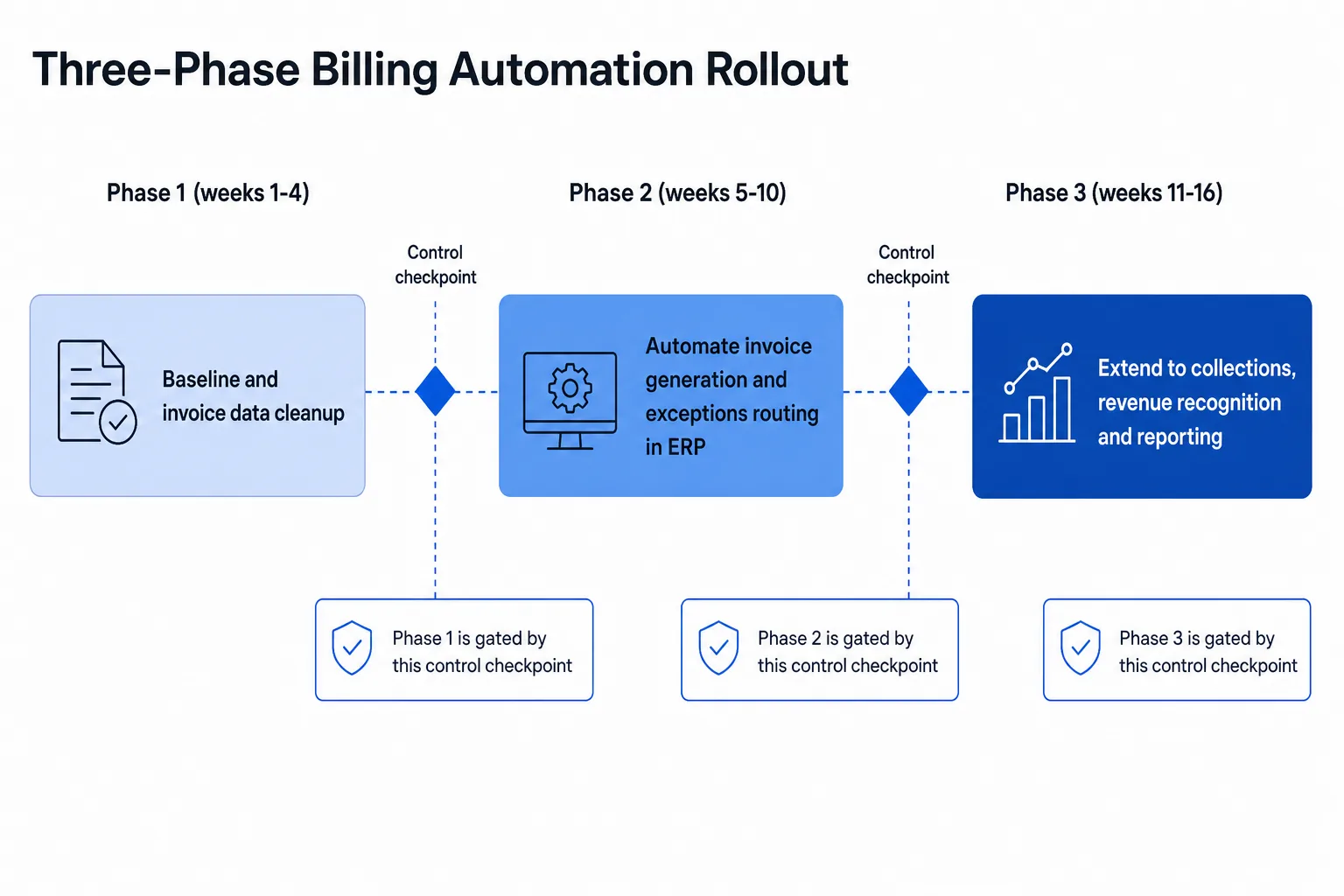
A phased rollout limits risk by proving one billing flow before expanding. For SMB-scale teams, phasing also keeps the first automation finance spend small and reversible, and finance automation solutions scoped to one entity can start well under the platform price range above.
- Weeks 1 to 4: Clean customer and item data, document the current process and capture baseline metrics.
- Weeks 5 to 10: Automate invoice generation and exception routing for one entity or product line inside the ERP.
- Weeks 11 to 16: Extend to collections, revenue recognition support and reporting once exception rates fall within your agreed threshold.
Each phase ends with a control checkpoint reviewed by finance leadership. Common failure modes are migrating dirty data, skipping exception ownership and going live across all entities at once.
Conclusion
Automation finance projects succeed when buyers evaluate on integration, controls and exception handling rather than feature lists. Score vendors with a weighted scorecard, compare the three options against your team profile and keep humans on judgment calls. Build the board case from your own baseline, then roll out in phases with control checkpoints.
Book a 15-minute call with tkxel. We will tell you the one billing workflow worth automating first.


